Photo to Comic: How to Turn Your Photo into a Comic Book Character
May 2, 2026 · 9 min read
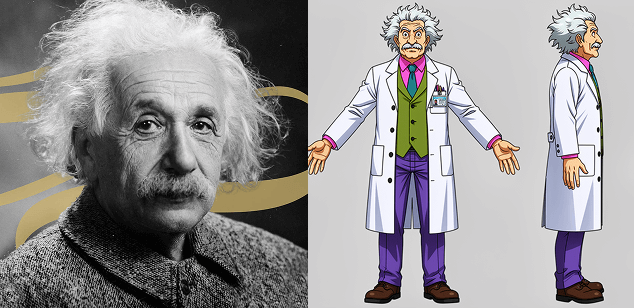
You have a photo. Maybe it's a photo of yourself, a friend, a pet, or an original character you sketched. You want it turned into a comic book character — not a generic AI cartoon version, but a real comic character that looks like that person, consistently, across multiple panels and pages.
That second part is the hard part. Generating a single cartoon image from a photo is easy — dozens of apps do it. Keeping that character consistent through a full comic story is something almost none of them can do. This guide explains how photo-to-comic conversion actually works, what makes consistency so difficult, and how modern AI tools approach the problem.
What "Photo to Comic" Actually Means
When people say they want to turn a photo into a comic character, they usually mean one of three different things — and understanding which one you want determines which approach to use:
- Single panel / avatar: One image of the character in comic style. Good for profile pictures, cover art, prints. Easy.
- Character across multiple scenes: The same character appearing in different poses, outfits, and situations throughout a story. Hard — this is the consistency problem.
- Character interacting with a story: The character placed inside a fully illustrated comic narrative — speaking, reacting, moving through a world. The hardest version, and the most rewarding.
Most "photo to comic" apps solve the first problem. YarnSaga solves all three.
Why Photo-to-Comic Consistency Is Technically Difficult
Standard image-generation AI has no concept of identity across generations. Every time you generate an image, the model starts from scratch with only your text prompt. Even if you write "brown-haired woman with a scar on her left cheek" and generate ten images, you'll get ten different women — all matching the description, but none looking like the same person.
The photo-to-comic consistency problem requires the model to:
- Extract key identity features from the source photo (face shape, skin tone, hair, distinctive features)
- Translate those features into a chosen art style (manga, superhero, webtoon) without losing the distinctive identity markers
- Reproduce those features reliably across different poses, expressions, angles, and lighting conditions
- Maintain consistency through an entire multi-page story — not just two or three panels
This is not a prompt engineering problem. You cannot reliably solve it by writing very specific text descriptions. It requires a dedicated pipeline that anchors the character's visual identity at generation time.
How the Photo Analysis Pipeline Works
Modern AI comic generators that handle photo-to-character properly use a multi-stage pipeline:
Stage 1 — Vision analysis: The uploaded photo is analyzed by a vision model (YarnSaga uses Claude Haiku for this step). The model extracts a structured character description: facial features, hair color and style, skin tone, eye color, build, any distinctive marks. This isn't just a caption — it's a machine-readable character sheet that will be used to constrain every future generation of that character.
Stage 2 — Character sheet generation: Using the extracted description, a character reference sheet is generated — front view, side view, and back view of the character in the target art style. This three-view sheet becomes the visual anchor. Instead of describing the character in text for every panel, the model is shown these images and asked to render the character in the same style as the reference.
Stage 3 — Scene generation with visual reference: When generating individual panels, the character reference sheet is passed to the image generation model alongside the scene description. The model renders the scene with the character's appearance constrained by the reference images — not just the text description.
The result is a character who looks like the original photo subject, rendered in your chosen art style, who stays consistent across every panel of a multi-page comic.
Best Photos for Comic Conversion
Not every photo produces equally good results. The vision analysis stage works best when:
- The face is clearly visible: Front-facing or slight 3/4 angle. Profiles, extreme angles, or heavily obscured faces give the model less to work with.
- Good lighting: Even, natural lighting. Heavy shadow across the face, backlighting, or harsh direct flash creates ambiguity in features like skin tone and eye color.
- Minimal obstruction: Sunglasses, hats with deep brims, masks, or hands in front of the face reduce analysis accuracy.
- Single subject: One person or character clearly in focus. Group photos create ambiguity about which subject is the intended character.
- Reasonable resolution: At least 512×512 pixels. Very small or heavily compressed photos lose the fine detail the vision model needs to extract distinctive features.
That said, the pipeline is designed to be robust — even an imperfect photo will produce a character with reasonable consistency. Perfect photos produce excellent consistency.
Choosing the Right Art Style for Your Photo Character
The art style choice affects how much of the original photo's character comes through. Some styles preserve more real-world likeness; others stylize more heavily:
- Semi-realistic: Closest to the original photo. Preserves fine facial features, realistic proportions, detailed rendering. Best for realistic portraits that happen to be in comic format.
- Superhero classic: Strong stylization but maintains realistic proportions. Recognizable features come through well — good for character-driven action stories.
- Webtoon / Manhwa: Soft stylization with large eyes and smooth skin. More idealized than realistic — facial structure comes through but specific features are softened.
- Manga flat: Heavy stylization. Distinctive features (hair color, broad facial shape, distinctive marks) come through, but fine details are simplified.
- Chibi: Extreme stylization — characters are small-body, large-head. Recognizability is limited to hair, color, and broad distinctive features. Best for cute/comedic stories, not realistic character representation.
Photo to Comic for Real Personalized Stories
The practical application most people reach for is personalization — creating a comic where you (or a friend, family member, or partner) are the main character. A birthday gift. A retirement tribute. A personal adventure story. A commemorative piece for a couple.
This is a fundamentally different product from AI stock images. You're not generating a random character who happens to look vaguely similar — you're building a character who is recognizably that specific person, placed inside a real comic narrative that was written for them. The photo is the anchor; the story is the gift.
For this use case, the consistency requirement is especially high. If you're making a 20-panel comic gift for someone and the character looks slightly different in every other panel, the gift doesn't work — the whole point is that the character is unmistakably them. This is why the multi-stage photo analysis pipeline matters so much for personalized comic creation, not just for professional comic production.
Beyond Faces: Full Character Conversion
Photo-to-comic doesn't have to mean just face conversion. You can bring in:
- Outfit details: A specific costume, uniform, or signature clothing style extracted from the photo and maintained across panels
- Props: A character who always carries a specific item — a guitar, a briefcase, a particular weapon — visible in the reference photo and preserved in generation
- Pets and animals: Photo analysis works for pets too — a dog or cat can be extracted from a photo and rendered as a consistent comic character alongside their human
- Distinctive marks: Tattoos, scars, birthmarks, and other identifying features extracted and carried through the character sheet
Common Questions About Photo-to-Comic Conversion
Will my character look exactly like the photo?
No — and that's intentional. The goal is a recognizable character rendered in the art style, not a photorealistic rendering. Semi-realistic style gets closest to photo likeness. Manga and chibi styles make more dramatic visual transformations. Think of it like a skilled caricaturist's portrait — it captures the person, rendered in a specific artistic language.
Can I use a drawing or illustration instead of a photo?
Yes. The vision analysis pipeline doesn't require a photograph specifically — it extracts character features from any visual reference. A detailed character illustration, a sketch, or an existing digital character design all work as input. The model reads whatever visual information is present.
Does the character degrade across many panels?
In most image-generation pipelines, yes — consistency degrades over time because each generation is stateless. The three-view character sheet approach mitigates this significantly because the visual reference is passed explicitly with every generation, not just implied through text. The character sheet is the anchor that prevents drift.
Can I create multiple characters from photos in the same story?
Yes — most photo-to-comic generators support multiple characters per story, each with their own reference sheet. You can build an entire cast from photos and they'll all maintain their individual identities across the story.
Create your first story — no drawing skills needed
Characters stay consistent across every panel, automatically.
Request Early Access →More Articles
Explore YarnSaga