How to Turn Your Comic into an Instagram Carousel (with AI)
June 8, 2026 · 6 min read
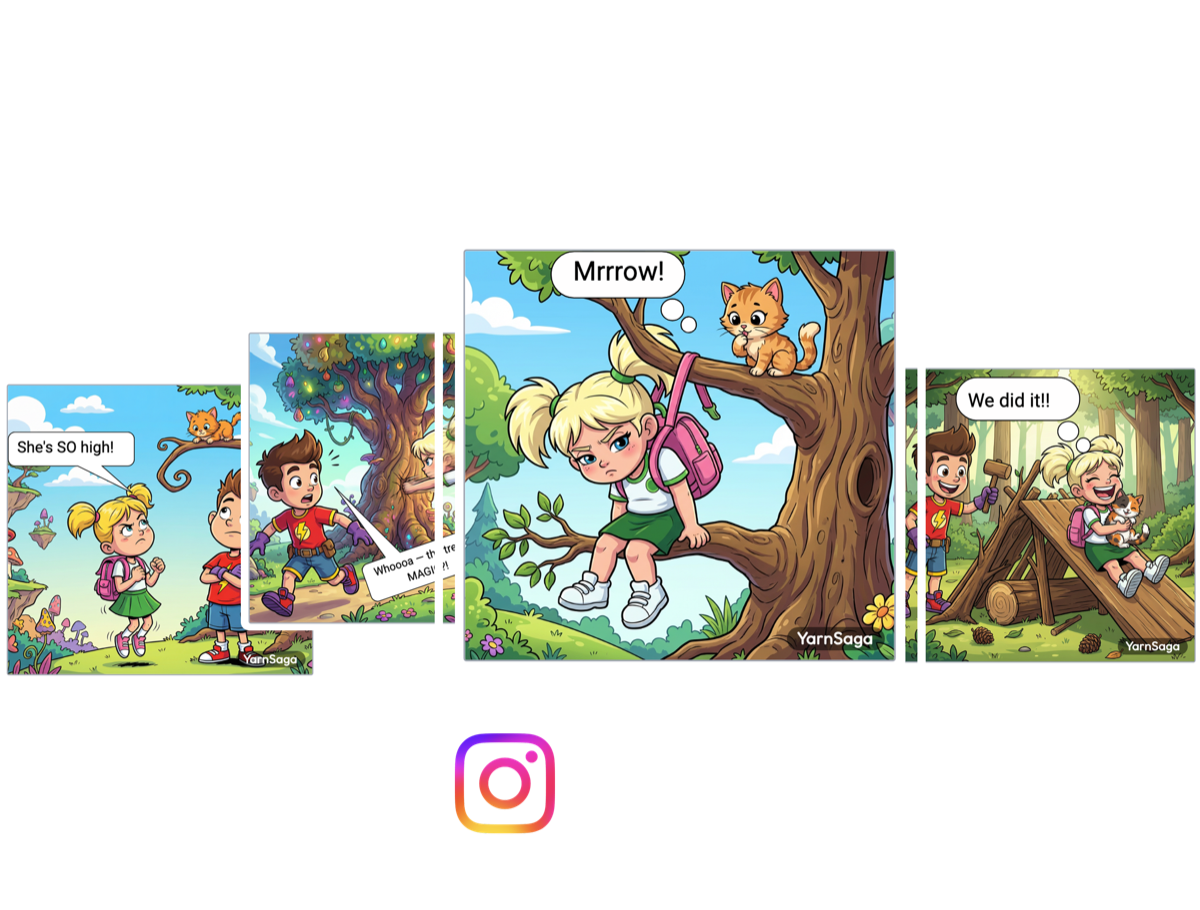
Instagram is one of the best places on the internet to publish a comic. Carousels get saved, shared, and swiped all the way through — a multi-slide story is practically the native format of the platform. But actually getting a comic onto Instagram has always been the annoying part: panels get cropped to the wrong aspect ratio, your characters look different from slide to slide, and you end up fighting Photoshop or Canva just to size and number everything correctly.
YarnSaga now does the whole thing for you. You can build a comic strip as an Instagram carousel — square or portrait, sized natively — and export it as a ready-to-post ZIP of numbered slides. This post walks through exactly how, plus the sizing and consistency tips that make a carousel actually perform.
One comic, exported as a swipeable Instagram carousel.
Why a carousel is the right format for a comic
A single image gives you one panel. A carousel gives you a sequence — and sequence is what a comic is. Each swipe is a beat: a setup, a turn, a punchline. Instagram lets a carousel hold up to 20 slides, which is plenty for a gag strip, a short scene, or an episode of an ongoing series. Carousels also tend to earn more dwell time and saves than single posts, because every swipe is a small reason to keep going.
The catch is that all of those slides have to be the same size, in the same order, with the same characters. That's exactly the part YarnSaga automates.
Step 1 — Start a carousel and pick your slide shape
When you create a new story, choose Instagram Carousel as the type, then pick a slide shape for the whole story:
- Square (1:1) — 1080×1080. The classic Instagram look; reads cleanly in-feed and on the grid.
- Portrait (4:5) — 1080×1350. Taller, so it takes up more vertical space in the feed and gives each panel more room. Great for dialogue-heavy strips.
You set this once and every slide inherits it, so nothing ever gets cropped or letter-boxed on upload. Each carousel can hold 1 to 20 slides, and you can add, remove, and reorder them at any time.
Step 2 — Create your characters once
This is the step that separates a real comic from a pile of unrelated AI images. In YarnSaga you design a character once — by description or from a photo — and it's locked to a reference image that's reused on every slide. The same face, the same outfit, slide after slide, with no drift. If you want the full breakdown of how that works, see how to keep your AI comic characters consistent.
Step 3 — Write each slide in plain English
For every slide, describe what happens — "Mia spots the cat stuck high in the oak tree; she looks up, worried" — and YarnSaga draws it in your chosen art style, with your characters already consistent. No prompt engineering, no design software. Add speech bubbles and captions right on the slide. Think of each slide as one beat in the story and you'll naturally pace the carousel well.
Step 4 — Export a post-ready ZIP
This is the part that used to take an hour in an image editor. Hit export and YarnSaga gives you a ZIP of your slides as numbered JPGs — 01.jpg, 02.jpg, 03.jpg — in reading order, at native Instagram resolution. Unzip on your phone (or hand the files to your scheduler) and upload them to a carousel in order. No cropping, no resizing, no renaming.
By default each slide carries a small "made with YarnSaga" badge, which helps other people find the tool. If you'd rather post clean, you can remove it for 1 credit per carousel.
Sizing and pacing tips that make carousels perform
- Pick 4:5 if your strip is wordy. The extra height gives speech bubbles room to breathe and keeps text legible in-feed.
- Front-load the hook. Slide 1 is your thumbnail and your scroll-stopper — open on the most intriguing or funniest beat.
- One idea per slide. Resist cramming two story beats onto one image; the swipe is the pacing.
- End on a payoff or a question. Give people a reason to comment, save, or wait for the next episode.
- Keep the cast consistent. Recurring characters are what turn one-off posts into a series people follow.
Great for serialized content
Because characters carry across stories, carousels are a natural fit for social media content creators running an ongoing strip — a weekly gag, a slice-of-life series, a brand mascot. Reuse your cast, change the scene, export the next carousel. If you just want a quick multi-panel strip without the carousel export, the comic strip generator covers that too.
Make your first carousel
That's the whole loop: pick a format, create your characters, write each slide, export the ZIP, post. From idea to a swipeable Instagram carousel without ever opening a design tool. See the full feature on the comic strip maker page, or jump straight in and build one.
Create your first story — no drawing skills needed
Characters stay consistent across every panel, automatically.
Request Early Access →More Articles
Explore YarnSaga