Reuse Your Characters Across Stories — Free, Instant, Identical
May 24, 2026 · 6 min read
If you've been building a series in YarnSaga — episodes, chapters, volumes, anthologies, anything where the same cast shows up in more than one story — you've probably hit the same friction. Designing a character in Episode 1, generating their character sheet, then having to redo all of that for Episode 2. New credits spent. A slightly different face every time, because AI image generation never produces the exact same output twice from a written description.
As of this week, that's solved. You can now import any character or prop you've already created in one YarnSaga story directly into another story — for free. No credits charged, no new AI generation, no visual drift. The exact same character sheet image is reused, so your protagonist looks pixel-identical from Episode 1 to Episode 100.
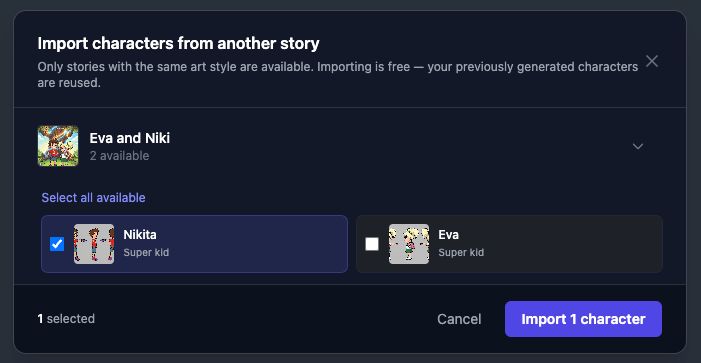
The new import modal — pick a source story and check the characters you want.
Watch how it works
Two-minute walkthrough showing the whole flow — from opening the Characters tab to picking source stories to seeing the imported character live in the new story.
Why this matters
Every character sheet in YarnSaga is generated once, gets uploaded to our CDN, and becomes the visual reference for every panel that character appears in. Generating that sheet costs credits, and even with identical descriptions, the AI never produces the same face twice. That's fine when a character lives inside one story — but the second you start a sibling project, you face a choice: pay again and accept the visual drift, or skip the character entirely.
Import collapses that choice. The character sheet on our CDN is a fixed image; reusing it across stories costs nothing and guarantees pixel-level visual consistency. You pay for the character once and reuse them forever, across as many stories as you want.
How to use it
- Open the story you want to import into — your destination story.
- Go to the Characters tab (or Props tab — same feature, parallel button).
- Look at the toolbar at the bottom of the screen. Next to the existing "Add character" and "Photo upload" buttons there's a new copy icon. Click it.
- A modal opens listing your other YarnSaga stories that share the same art style as the current one. Click a story to expand it and see its ready characters.
- Check the characters you want to import, or hit Select all available to grab everything in one go.
- Click Import N characters. They appear in the current story instantly. Done.
The whole flow takes seconds. No background generation, no waiting on fal.ai, no credits deducted. The character is in the destination story and ready to be used in scenes immediately.
The same-style restriction
Import only lists source stories that share the destination story's art style. If your destination story is in Manga / Anime, you'll only see other manga stories in the source list. If it's in Cinematic Realism, only cinematic source stories show up.
This is deliberate. Character sheets are generated in the art style of the story they were created in. A character drawn in manga flat style isn't going to slot cleanly into a story drawn in noir cinematic — the line work, color palette, and rendering approach are fundamentally different. The imported character would look like an obvious pasted-in mismatch.
If you really need the same character across styles, the right move is to regenerate their sheet in the destination style — though that does cost credits because it's a fresh AI generation, not a copy. Import is specifically for free, identical, same-style reuse.
Duplicate protection
YarnSaga tracks which characters and props you've already imported into a given story. If you've previously imported a character and you open the import modal again, you'll see that character marked as Already imported — pre-checked and locked. You can't accidentally import the same character twice into the same story.
This also means: if you delete an imported character and decide you want them back, you can re-open the import modal and pull them in again from the same source story.
The series use case
The clearest workflow this unlocks is building a series. If you're making a multi-part graphic novel, episodic webtoon, anthology of short stories in the same world, or any project where your cast persists across multiple individual story files, here's the pattern:
- Pick your series' art style and lock it in. Every story in the series will use this style.
- In your first story (the "pilot" or "Episode 1"), define your main cast and signature props. Wait for all character and prop sheets to finish generating.
- For every new episode after that, create the story, then open the Characters tab and Props tab and use the import button to bring in your main cast in one click. Done.
You save credits. You guarantee visual consistency between episodes. You skip the busywork of redefining your protagonist for the fifth time. And readers who follow you across episodes get a coherent visual experience — Episode 3's hero looks exactly like Episode 1's hero, because it is Episode 1's hero.
What gets copied (and what doesn't)
An imported character is a full independent copy in the destination story. Renaming it, editing fields, regenerating the sheet, or deleting it has no effect on the original in the source story. They're separate records that happen to share the same reference image on our CDN.
Scene descriptions that mention the character match against the destination story's copy, not the source. The /-mention picker, the auto-detection by name, and the reference image injection during panel generation all use the imported copy's identity. From the AI's perspective, it's just another character in the current story — it doesn't know or care where it came from.
What doesn't carry over: scene history. The imported character doesn't bring along any panels they appeared in or any context from the source story. Imported characters start fresh in the destination, ready to be put into new scenes.
Why we built this
Two reasons, equal weight.
First, users with multiple stories were quietly paying twice (or three times, or ten times) for the same character. Every time someone started a new story in the same universe they had to either rebuild the cast and burn credits doing it, or settle for visual inconsistency. Neither felt right. Free import fixes the economics — you pay to generate a character once, you reuse them forever.
Second, this unlocks the series workflow that creators on the platform have been asking for. Episodic webtoons, comic chapters, multi-volume graphic novels, anthology projects — all of these are built on the assumption that the same characters show up across multiple "stories." YarnSaga's data model treats each story as independent, but with import the dependency between stories can now be expressed (and exploited) by creators directly.
Try it
The feature is live in every YarnSaga account right now. Open the app, pick any story, head to the Characters or Props tab, and look for the new copy icon in the toolbar. If you've got two stories in the same art style, you'll see the import option populate immediately.
Full guides if you want the deep dive: Importing characters · Importing props.
If you're building a series and you'd like to share what you're making — or if you've got a use case the import flow doesn't quite cover yet — drop me a note. I read everything.
Create your first story — no drawing skills needed
Characters stay consistent across every panel, automatically.
Request Early Access →More Articles
Explore YarnSaga