Sketch Your Panel First — Then Let AI Generate It
May 7, 2026 · 5 min read
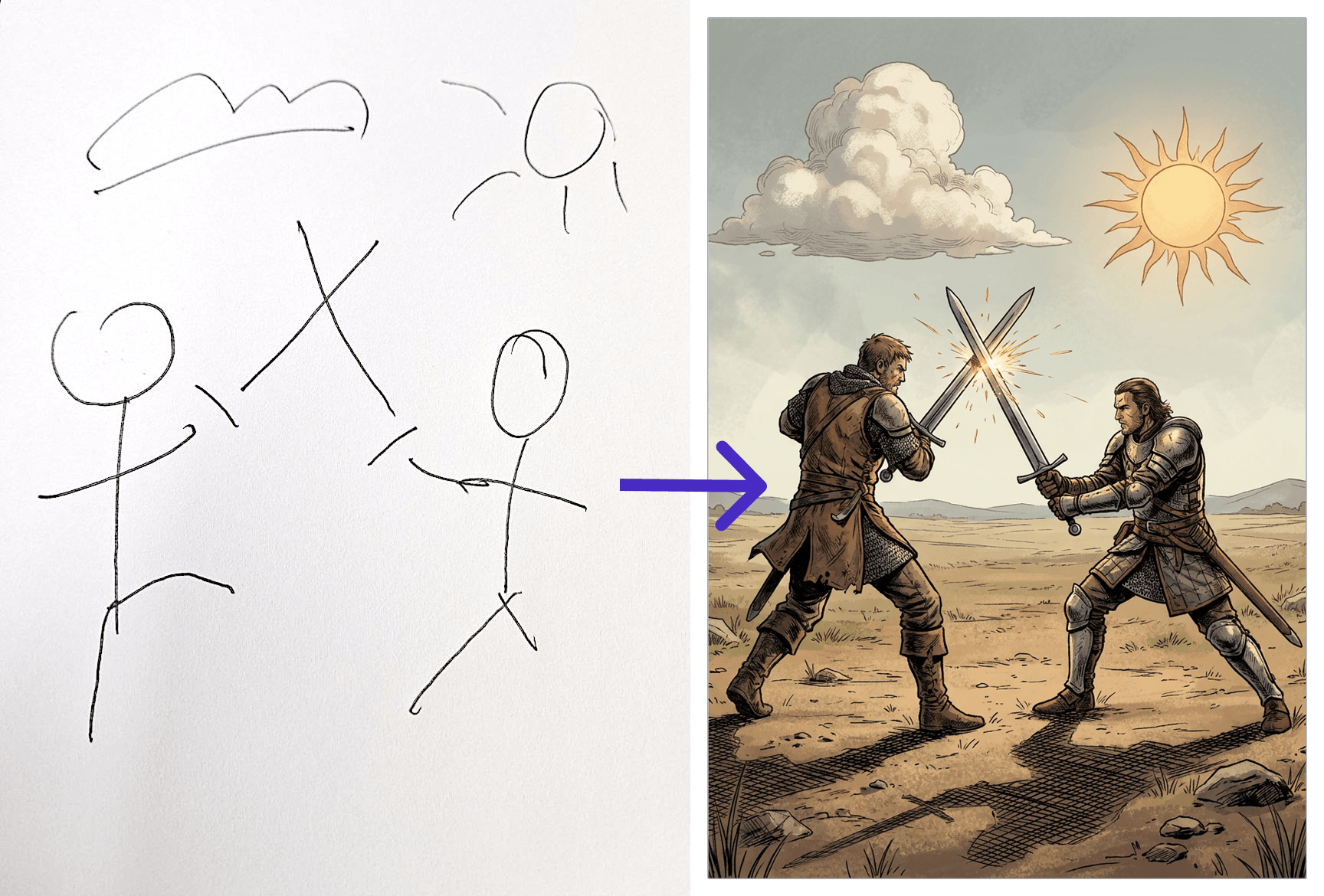
Most people generate AI comic panels blind — they type a scene description and hope the AI puts the characters in the right place. Sometimes it works. More often, the composition is off: the character is in the wrong corner, the angle is wrong, two characters overlap in an awkward way. You regenerate. Still wrong. You tweak the prompt. Closer, but not quite.
There's a better way. Sketch the layout first — then let AI generate from it.
Why Blind Prompting Fails for Composition
AI image models are excellent at generating aesthetically consistent scenes. They're much worse at following precise spatial instructions from text alone. "Character on the left, guard on the right, door in the background" sounds specific. To the model, it's vague — "left" could mean anywhere on the left half of the frame, the relative scale is ambiguous, and the depth cues are missing.
The result is panels that look good in isolation but feel random when read in sequence. Panels where the storytelling logic — who's in focus, what they're reacting to, what the reader's eye should move toward — gets lost in the generation.
Sketching solves this not by improving the prompt, but by replacing the spatial part of it entirely.
What "Sketch to Scene" Actually Does
When you upload a sketch in YarnSaga, the AI reads it as a composition map. It extracts:
- Who is where — the rough position of figures in the frame
- What angle — whether you're looking at the scene from eye level, above, below, or from the side
- What's in the room — background shapes, furniture, architecture, objects
- Scale relationships — which figures are in the foreground vs. background
It then generates the finished panel in your chosen art style, with your character sheets applied — but respecting the composition you drew.
You Don't Need to Draw Well
This is the part that surprises most people. The sketch doesn't need to be good. It doesn't need to be on paper. It doesn't need to look like anything except a rough spatial map.
Stick figures work. Circles and rectangles work. A napkin drawing photographed on your phone works. The AI isn't grading your art — it's reading your intent. Where are things? How big are they relative to each other? What's in the foreground?
The sketch in the example below was drawn in under two minutes. The result is a finished interrogation room scene with the character placed exactly where the sketch indicated.
Left: hand-drawn sketch. Right: finished AI panel generated from it.
How to Drop Your Character Into the Sketch
There's one more thing the sketch workflow unlocks: exact character placement. When you drop your character sheet directly into the sketch before uploading, the AI sees both the composition guide and the character reference together. The result is that your character appears in exactly the position you drew — not approximately, not "somewhere on the left," but at the specific spot, scale, and angle indicated by the sketch.
This is how the interrogation scene works: the character is in the chair because that's where the sketch showed him. The guards are flanking because that's what the stick figures indicated. The composition was set before a single pixel was generated.
Watch It in Action
The short video below shows the full process — from rough sketch to finished panel — in real time.
Step-by-Step: Using Sketch to Scene
- Draw the layout — use any paper, whiteboard, or digital tool. Stick figures for characters, rectangles for furniture, rough lines for architecture. Mark who should be in the foreground vs. background.
- Photograph or scan it — phone camera is fine. Decent lighting, no need to flatten or clean it up.
- Open the panel in YarnSaga — click the panel you want to generate, then switch to sketch mode.
- Upload the sketch — optionally drag your character sheet into the sketch to lock their position.
- Write a minimal scene description — since the sketch handles composition, the text prompt only needs to describe what's happening, not where things are. "Interrogation room. Two guards watching. Tension." is enough.
- Generate — the panel renders in your chosen art style with the composition you drew.
When to Use Sketches vs. Pure Text Prompts
Not every panel needs a sketch. Text prompts are faster for simple scenes — a character standing alone, a close-up reaction shot, a wide establishing shot with no specific placement requirements.
Sketches pay off for panels where the spatial arrangement matters to the story: confrontations, crowd scenes, chase sequences, panels with multiple characters interacting, or anything where the reader's eye needs to move in a specific direction. These are exactly the panels that text prompts consistently get wrong.
Think of it this way: use text prompts when you want AI to make a creative choice about composition. Use a sketch when you've already made that choice yourself.
Create your first story — no drawing skills needed
Characters stay consistent across every panel, automatically.
Request Early Access →More Articles
Explore YarnSaga