YarnSaga Updates: Landscape Pages, Auto Quality Check, and Background Exports
May 17, 2026 · 5 min read
This week's release is a big one — we shipped four major features and a stack of fixes, including the long-awaited landscape page format, automatic AI quality control on every generated panel, multi-character consistency upgrades, and a rebuilt export pipeline that runs in the background while you keep editing. Here's everything that's new.
1. Landscape Page Format — Tell Stories Sideways
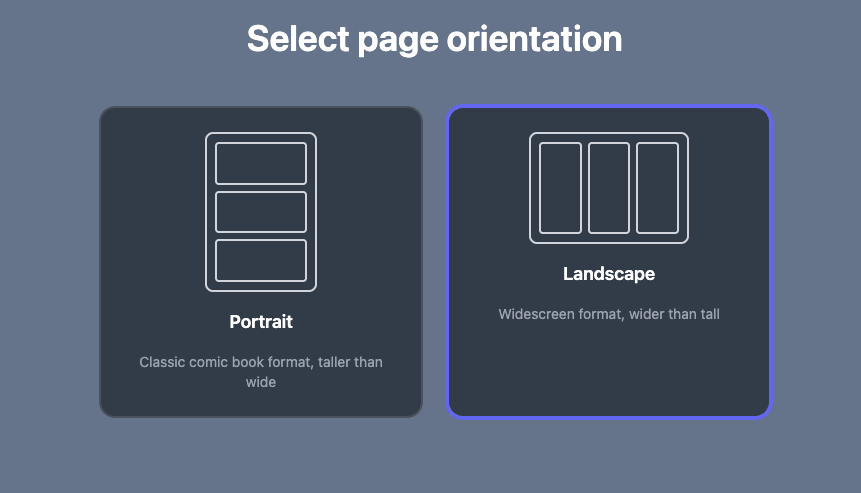
Landscape stories now sit alongside the classic portrait format.
Until today, every YarnSaga story was portrait. Now when you create a new story you pick: classic Portrait for traditional graphic novel feel, or widescreen Landscape for cinematic, screen-first reading. Pages, covers, panel templates, and exports all respect the orientation you choose.
Landscape is great for action sequences, slice-of-life strips, web comics, and anything meant to be read on a laptop instead of printed — the eye travels across the page instead of down. You pick once when creating the story, and every page from cover to last panel stays in that format.
One nuance: covers always stay portrait, like a book jacket, regardless of the story orientation you choose. That's a deliberate design decision — covers act as your story's "shelf face" everywhere it appears (story list, share previews, social cards), and a uniform portrait shape keeps the gallery clean.
2. Automatic Quality Check — Bad Panels Fixed for Free
Every panel YarnSaga generates is now reviewed by AI the instant it lands. If the result is off — wrong character, broken anatomy, distorted features, missing details — the system silently re-generates the panel for free before you ever see the broken version. Zero clicks, zero wasted credits, sharper output by default.
You don't need to do anything to enable this. Just generate normally and let the system catch the misses. You only pay for the version you actually keep. Learn more about panel generation →
3. Multi-Character Scenes Stay Consistent
When two or more of your characters share a panel, YarnSaga now preserves their relative heights, builds, and skin tones across every shot. A tall character stays tall, a slim character stays slim, and the cast no longer morphs into look-alikes between panels.
This was the #1 frustration users raised with multi-character storytelling — the AI would silently equalize character proportions panel-to-panel, breaking the visual identity you'd carefully set up in character sheets. That's fixed. Learn more about using characters in scenes →
4. Background Exports + New Downloads Menu
Exporting a page no longer freezes you in place. When you download a page as PNG, JPG, or PDF, the export now runs on our servers in the background while you keep editing. A new downloads menu in the top-left header lights up when files are ready and holds them for 24 hours, so you can grab them whenever.
A small download icon shows what's happening at a glance: a pulsing blue dot means something is generating, a green number badge means that many files are ready and waiting.
As part of the rebuild, the long-standing bug where speech bubbles always rendered in their original size and orientation in exports is now fixed — bubble flips, resizes, and rotations match the editor pixel-for-pixel. The whole pipeline is also roughly 3x faster than before thanks to a new server-side rendering engine. And re-exporting a page after edits always gives you a fresh, up-to-date file — no more stale cached versions. Learn more about exports →
5. Smarter Character Name Detection
Just type a character's name in a scene description and YarnSaga attaches them automatically — even without using /. Works with full name, nickname in quotes, or first name alone. Use / when two characters share a name to remove any ambiguity.
Quoted nicknames like Tadashi Maeda "Mizuki" now work correctly even in multi-character panels — the AI no longer swaps quoted-nickname characters with other cast members. Each mention of a character in a scene description is anchored to their reference image individually, so multiple appearances on the same panel stay consistent. Learn more about using characters in scenes →
Smaller Fixes & Polish
- Better error visibility — failed panels now show a clearer "View Error Message" button so you can see exactly what went wrong instead of guessing from a status code.
- Cover regeneration on every publish — your cover thumbnail is always fresh, no more stale previews after edits.
- Sketch-to-scene upgraded — your uploaded sketch is now passed directly to the AI as a composition reference, so figure positions, camera angle, and depth are matched more accurately.
What's Next
A cleaner multi-page PDF export flow is in active development — better page sizing, cover bundled with the pages, print-ready output. If you export for zines, classroom prints, comics fest tables, or anything physical, reply to our weekly newsletter and tell us what your workflow looks like — we'll make sure it's covered.
Try It
All of this is live now. Open YarnSaga and start a new story to see the landscape option, or continue an existing one to feel the speed and consistency upgrades. If you'd like the weekly recap in your inbox, drop us a note and we'll add you to The Weekly Saga — our short Sunday newsletter covering every release in plain English.
Create your first story — no drawing skills needed
Characters stay consistent across every panel, automatically.
Request Early Access →More Articles
Explore YarnSaga