Why Your AI Comic Character Looks Different in Every Panel (And How to Fix It)
March 28, 2026 · 8 min read
You spent 20 minutes crafting the perfect character description. Silver-white hair, violet eyes, that crescent moon birthmark. You generated the first panel — stunning. Exactly what you imagined.
Then you generated the second panel.
Same prompt. Different scene. And your character has brown hair now. The birthmark is gone. The face is subtly different — familiar but wrong, like a twin you've never met.
This is character drift — the single biggest frustration in AI comic creation. And it's not your fault. It's how image generation models work. Here's exactly why it happens, and how to stop it.
What Is Character Drift?
Character drift happens when an AI image generator produces visually inconsistent versions of the same character across different prompts. Even when you use the same base description, factors like pose, lighting, camera angle, and generation randomness cause the model to silently reinterpret your character.
The result: your protagonist looks like a slightly different person in every panel. Hair changes shade. Eye shape shifts. The scar moves. The costume gets reinterpreted. For a single illustration, this doesn't matter. For a sequential story with 20, 40, or 100 panels — it breaks everything. Readers can't follow a character they can't recognize.
Why Does It Happen?
AI image models have no memory. Each generation is a fresh inference — the model has no idea what your character looked like in panel 3 when it's generating panel 17. All you're giving it is a text description, and text descriptions are inherently ambiguous. "Silver-white hair" can render fifty different ways depending on lighting, scene context, and the model's random seed.
Three things trigger drift most reliably:
- Changing the scene context. A character in a dark forest renders differently than the same character in bright daylight. Lighting literally changes how color, shadow, and facial structure appear — and the model adapts the character to fit.
- Changing the camera angle. Front-facing portraits are the most consistent. Move to a 3/4 view, side profile, or action shot and the model has less visual "certainty" about the face — so it takes more liberties.
- Adding pose or action. "Running through rain" gives the model a lot of new information to process. To accommodate it, the model often relaxes its grip on your exact character details.
What People Try (And Why It Doesn't Work)
Copy-pasting the same character description into every prompt
This helps at the margins, but doesn't solve the problem. The description is still text — still ambiguous — and still subject to scene-context reinterpretation. You'll get "similar" characters, not "the same" character.
Seed locking
Seed locking forces the model to start from the same random state. It preserves some consistency, but the moment your prompt changes meaningfully — a new action, new environment, new lighting — the seed's consistency breaks down. You also lose creative variation between panels.
Describing the character in extreme detail
More detail sounds like it should help. In practice, overly long descriptions give the model more things to selectively ignore. The model doesn't process text descriptions like a checklist — it weighs them probabilistically. More words don't mean more fidelity.
What Actually Works
The key insight: text alone cannot anchor a character. Visual references can.
Here are the techniques that work, in order of effectiveness:
1. Identify one unmistakable signature feature
Don't try to describe everything equally. Pick ONE visually distinct feature that will survive any angle, any lighting, any action — then make it appear explicitly in every scene prompt.
Good signature features are extreme enough to be unambiguous:
- An eye color that strongly contrasts with everything else — violet, silver, gold
- A specific accessory always worn — a red scarf, a mechanical arm, round wire glasses
- A facial marking too prominent to ignore — a scar across the cheek, face paint, a distinctive tattoo
- A hairstyle readable from any angle — asymmetric shave, vivid color, extreme length
Then in every scene prompt: "with her violet eyes clearly visible", "silver mechanical arm prominent in frame". You're telling the model what to preserve.
2. Add an anchor phrase to every scene prompt
Put this at the end of every prompt you write:
"exact same character appearance as established, [signature feature] visible, consistent throughout"
This signals to the model that consistency is the priority. It sounds small, but it significantly reduces the rate of drift — especially combined with the signature feature approach.
3. Generate a three-view character sheet before any panels
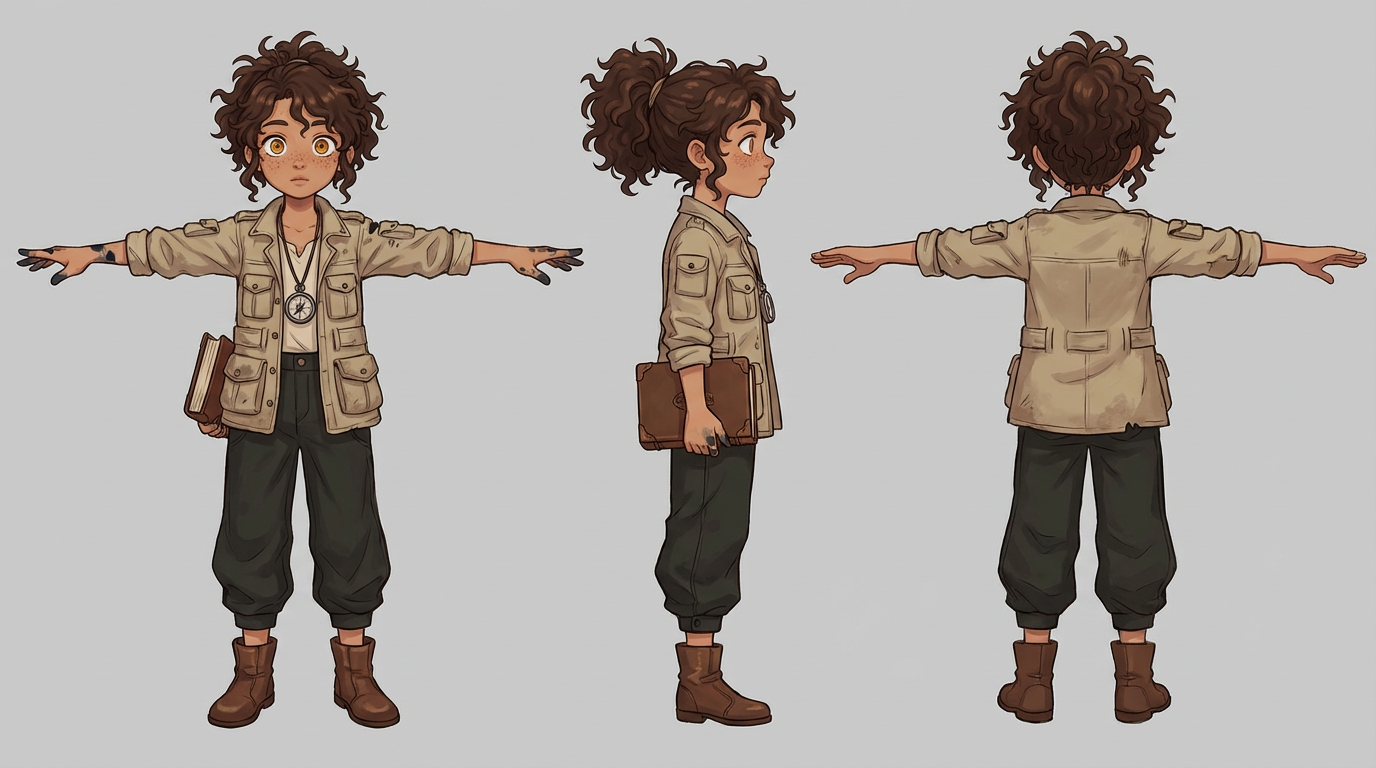
Before generating a single story panel, generate three reference views of your character: front-facing, three-quarter, and side profile. These become your canonical visual reference.
If your tool supports image references in prompts — most modern ones do — attach all three reference images to every scene prompt. Visual references are dramatically more reliable than text descriptions. The model is comparing against a real image, not interpreting words.
The more complete that reference is, the better. A full studio-style character model sheet — front, side and back turnaround, action poses, an expression study, and a hands close-up — gives the model far more to anchor to than a single portrait, which is exactly how YarnSaga now builds every character.
4. Keep character descriptions free of style language
Don't mix visual style instructions into your character description. "Dramatic cinematic lighting, hyperdetailed, 8K" belongs in the scene prompt — not the character profile. Style language competes with character anchors and causes the model to reinterpret appearance to match the style. Keep character descriptions clean: physical attributes only.
The Honest Reality
These techniques work. They'll take your consistency from "completely unreliable" to "mostly stable." But they require discipline — remembering to include anchor phrases, attaching reference images, maintaining the prompt structure across 40, 60, 80 panels. One slip and drift creeps back in.
For a single short story, it's manageable. For an ongoing series or anything longer than 15–20 panels, the manual overhead becomes a real creative burden.
How YarnSaga Solves This
YarnSaga was built specifically around the character consistency problem.
When you create a character, you define their appearance once: physical features, signature details, outfit. YarnSaga automatically generates a multi-angle character sheet — front, side, three-quarter — and uses those images as locked visual references for every panel you generate.
You describe the scene. The system handles character consistency. Same face, same hair, same costume — whether your character is sitting at a café in panel 4 or running through rain in panel 34. No anchor phrases to remember. No reference images to manually attach. No drift.
And it keeps improving under the hood: a recent generation upgrade made characters hold their face and build even more tightly across every art style.
Want the exact step-by-step? Here's how to keep your AI comic characters consistent across every panel → — including the tag-from-the-list workflow and the pre-generation review that cleans conflicting scene text for you.
If you've been wrestling with character drift in Midjourney, DALL-E, or any general-purpose image generator — this is what a tool built for sequential storytelling feels like. See how all the major AI comic tools compare →
Try YarnSaga → Character sheets, consistent panels, and 19 art styles — all built for the story, not the single image.
Create your first story — no drawing skills needed
Characters stay consistent across every panel, automatically.
Request Early Access →More Articles
Explore YarnSaga