Introducing Quick Start: One Prompt, One Click, a Finished Comic Strip
June 10, 2026 · 4 min read
Most people who want to make a comic never make one. Not because they lack ideas — because the blank page is intimidating. Which characters? What style? How many panels? Where do I even click first? That hesitation is where most stories quietly die.
So we built the shortest possible path from "I have an idea" to "I have a finished comic strip on my screen". It's called Quick Start, and it turns a single sentence into a complete, multi-panel strip with consistent characters — in about a minute, with one click.
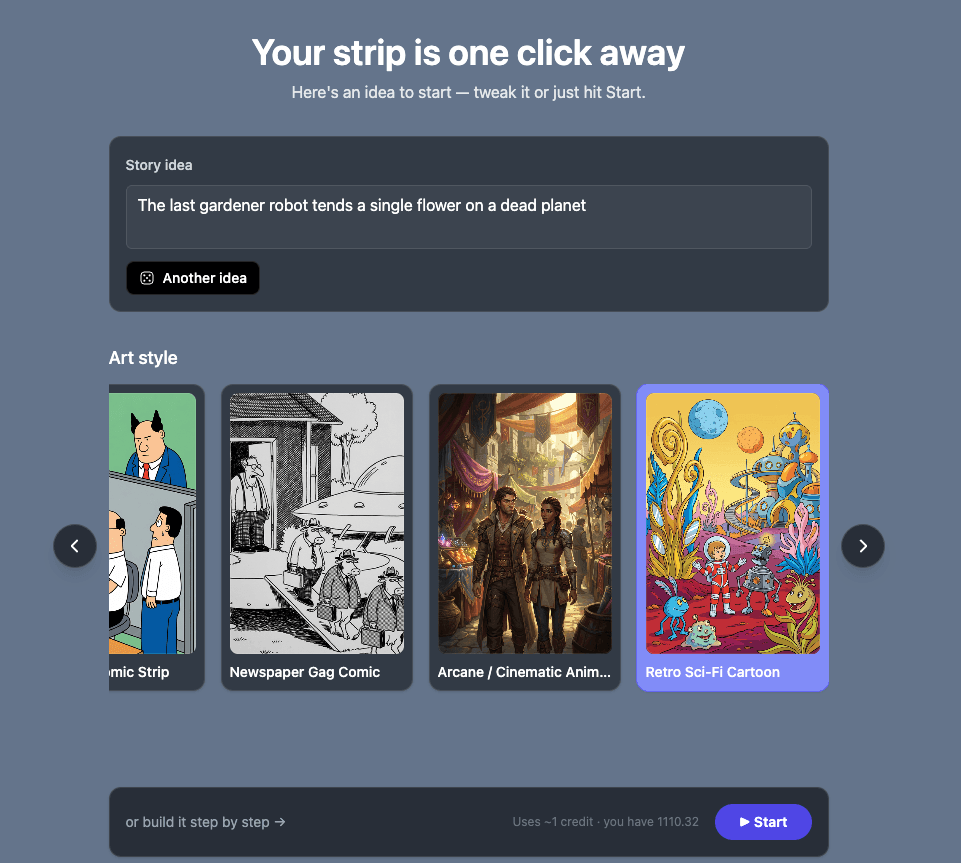
Quick Start: one idea, one click, a finished strip in about a minute.
One prompt in, a finished strip out
Here's the entire flow. You open Quick Start and there's already a story idea waiting in the box — you don't even have to think one up. Tweak it, type your own, or roll "Another idea" until something sparks. Pick an art style from the row of covers. Hit Start.
That's it. From there YarnSaga does the work: it writes a tiny story, designs and draws your hero, then generates a three-panel strip around them — all while a progress bar keeps you company for the 30–60 seconds it takes. When it's done, your strip opens directly in the full editor, ready to tweak, add speech bubbles, or keep building into something bigger.
No character sheets to fill in first. No empty canvas. No decision paralysis. One sentence becomes a real strip you can actually look at — and that first result is what makes people keep going.
The characters stay consistent — automatically
The hard part of AI comics isn't generating one nice image. It's getting the same character to look identical from panel to panel. Quick Start handles that for you: it designs your hero once, locks them to a reference, and renders every panel against it. So your protagonist looks like the same person in panel 3 as in panel 1 — no drift, no "why does she have a different face now."
If you've ever fought with this in other tools, we wrote up exactly why it happens and how we solved it in how to keep your AI comic characters consistent across every panel. Quick Start bakes that whole system in from the first click.
Who it's for
Quick Start is for the first five minutes with YarnSaga — and for anyone who just wants a fast win:
- First-timers who want to see what the tool can do before learning every feature.
- Content creators who need a quick strip for a post and don't want a 20-minute setup. (More on that in comics for content creators.)
- Storytellers testing a concept — generate a strip, see the tone, decide if it's worth expanding into a full graphic novel.
- Anyone stuck on a blank page who just needs momentum.
And because the strip opens in the real editor, Quick Start isn't a toy or a separate "lite mode." It's a doorway into the full app — the same canvas, the same export options, the same everything.
Pick your style, then go
Your strip is only as good as the look you choose, so Quick Start lets you set the art style up front — manga, chibi, superhero, noir, Ghibli-inspired, and more. Each one completely changes the mood of the same story. You can browse the full set on the art styles page and see how the same idea reads in a dozen different visual languages.
What it costs
A Quick Start strip uses about one credit — and credits are the same pay-as-you-go packs they've always been: bought once, valid for six months, no subscription. You can see the packs on the pricing page. The point of Quick Start is that your very first credit gives you a finished thing to hold onto, not a half-built project.
Try it now
It's live for everyone, right now. Open the app, hit Quick Start at the top, and watch a single sentence turn into a comic strip in about a minute.
As always — if you make something fun with it, or something breaks, email me directly. A real person reads every message.
Create your first story — no drawing skills needed
Characters stay consistent across every panel, automatically.
Request Early Access →More Articles
Explore YarnSaga