What's New: Polaroid Carousels, Characters in Your Own Words, and a Month of Polish
October 6, 2026 · 5 min read
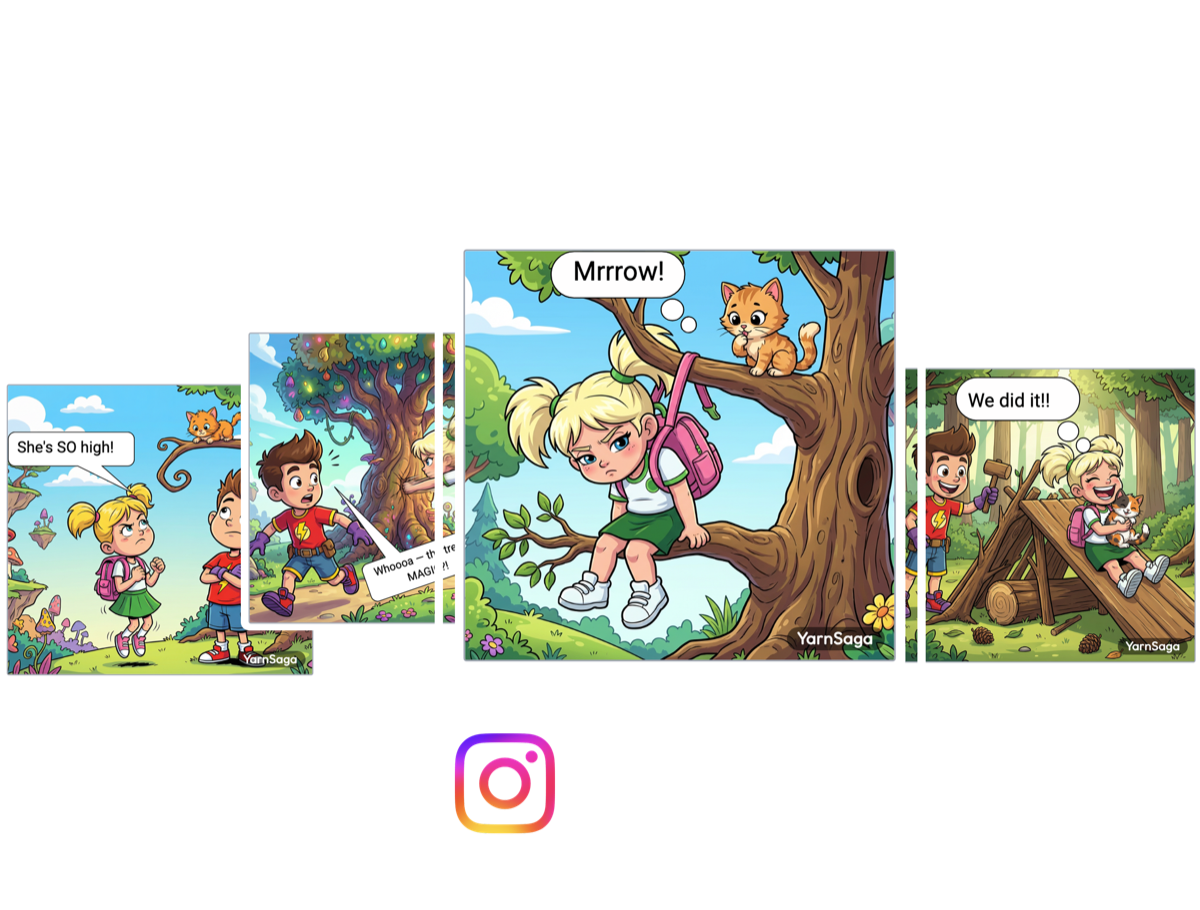
A month of updates in one place. The headline is a new shape for Instagram comic carousels — Polaroid, a square picture with a white strip underneath for your words. Around it: a simpler way to create a character, a new photorealistic art style, your whole story as one PDF, and a long list of small fixes that make the editor nicer to sit in for an evening.
New: Polaroid carousels
A carousel comic lives or dies on its text. Put the line of dialogue on top of the art and it fights the picture; leave it out and the slide has to carry the joke alone. Polaroid gives the words their own place. Each slide is a tall 4:5 post — the biggest shape Instagram shows in the feed — with your square picture on top, framed by thin white margins like a photo print, and a clean white strip underneath for a caption, a punchline or a line someone says.
- Pick it when you start. Choose Instagram Carousel, then Polaroid next to Square and Tall.
- Or convert a carousel you already made. Open the story settings and switch the slide format from Square to Polaroid. Your pictures stay exactly as they are — nothing is redrawn, no credits are spent — and every bubble and text box moves with its slide, landing on the same spot of the picture.
- Write straight onto the strip. Polaroid slides have the text tool on the toolbar, next to speech bubbles.
- Change your mind any time. You can switch back to Square. If anything sits on the white strip, the editor tells you how many items will go before it removes them.
- Post-ready export. The ZIP gives you numbered 1080×1350 images, in carousel order.
One honest limit: all slides in a carousel share one format. That isn't our rule so much as Instagram's — it crops every image in a post to the shape of the first one. If you're new to carousels, our step-by-step guide to turning a comic into an Instagram carousel covers pacing and slide counts, and it works the same way with Polaroid. It's a natural fit for creators who post comics on social media.
New: describe a character in your own words
The character form asks for ten separate details, and not everyone thinks about a character that way. There's now a simpler door. A new button in the Characters toolbar opens a short window: a name, a role, and a box where you just talk about them — how they look, what they wear, the one detail that never changes. AI fills in the full form from that, and you check it and press Create.
If what you wrote isn't enough to draw someone the same way twice — a personality with nothing about their looks, say — it tells you what's missing, gives an example, and keeps your text so you only have to add to it. That matters more than it sounds: a vague description is the most common reason a character drifts, and we wrote up how to keep AI comic characters consistent across every panel if you want the longer version.
New style: Live-Action Cinematic
Instead of drawing your story, this one renders it: photorealistic faces, materials that catch light the way real ones do, haze and shallow focus — closer to a film still than an illustration. It suits thrillers, sci-fi and anything that wants to feel shot rather than inked. See examples on the Live-Action Cinematic style page.
Your whole story as one PDF
Export no longer stops at one page. Download book (PDF) puts your cover and every page into a single file, in order, and it doesn't cost credits. In the same release every art style moved onto one newer, faster image engine, so a long book holds one look from the first panel to the last. The full story is in Your Whole Story as One PDF.
Panels that hold together
The month started with a consistency pass across every story: your cast keeps its look, the objects you define — a pet, a car, a keepsake — keep their own identity, and the quiet panels with nobody in them stay in the same visual world as the rest. Details in Panels That Hold Together.
Smaller things you'll notice
Speech bubbles. Three more shapes to choose from, including a balloon with its tail on the side and a caption box with a long pointer. Text is now centred on the balloon itself rather than on a box drawn inside it, and letters with tails — p, g, y — no longer get their bottoms clipped, on screen or in your export. Our guide to comic book speech bubbles explains which shape to use when.
A calmer editor.
- Every toolbar icon now shows a label when you hover over it.
- When a scene has nothing to correct, Generate goes straight to drawing instead of asking you to confirm a second time.
- The save status is a small cloud at the end of the toolbar rather than a label hanging under it — still there, just quieter.
- Toolbars and tabs have a light outline, so they don't blend into a pale page.
- Carousel slides show as separate sheets with a gap between them, so it's always clear where one ends.
- The bubble picker and the / menu always show their scrollbar, and the / menu no longer slips off the edge of the screen.
- The Create Character window no longer closes if you click outside it by accident.
Fixes. Images you add to your pages now save reliably. On long stories with many pictures, changes could stop saving without a word and those images went missing from downloads; they're now stored properly, affected stories have been repaired, and if a save ever fails you'll see a message instead of silence. We also fixed an error that could tell you that you were out of credits when you weren't.
Try Polaroid on a carousel you already have
It's the quickest way to see the point: open a square carousel, switch it to Polaroid in the settings, and put the line you'd been squeezing onto the picture where it belongs — underneath it.
Open the editor, or see the credit packs on the pricing page — no subscription.
Create your first story — no drawing skills needed
Characters stay consistent across every panel, automatically.
Request Early Access →More Articles
Explore YarnSaga