Richer Character Sheets: How Studio-Style Model Sheets Keep Your AI Characters Consistent
June 14, 2026 · 6 min read
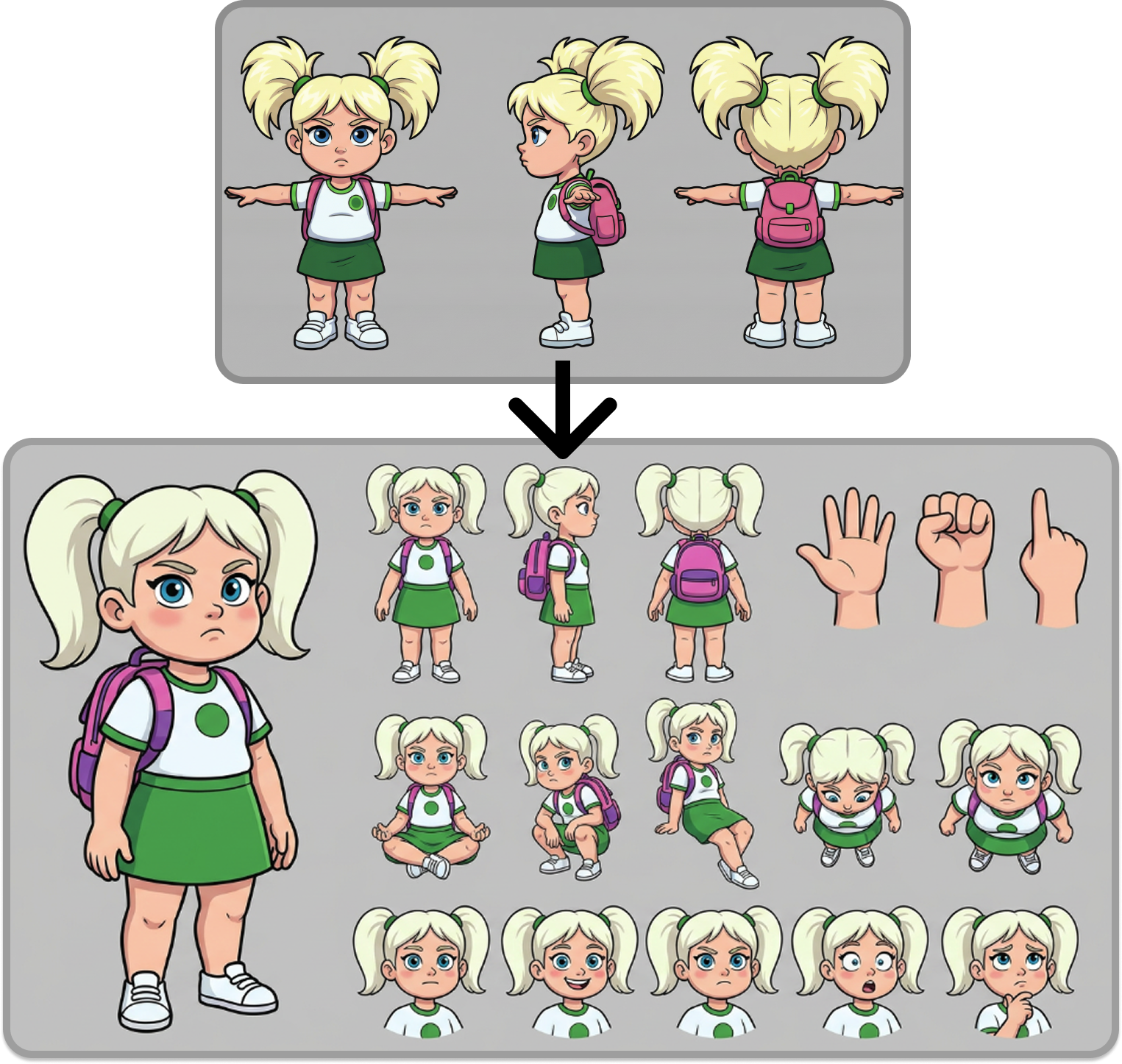
We just changed the single most important thing about how YarnSaga draws your cast. Every character is now generated as a full, studio-style character model sheet — not a single pose, but a complete reference document the AI can draw from. The result is the thing every AI comic creator actually wants: characters that stay consistent, panel after panel, with far less drift and dramatically fewer broken hands.
If you've ever wondered why your AI comic character looks different in every panel, this update attacks the root of it. Here's what a model sheet is, what changed, and how to get the most out of it.
A full model sheet: hero pose, front/side/back turnaround, action poses, an expression study, and a dedicated hands close-up.
What is a character model sheet?
A model sheet (sometimes called a character turnaround or reference sheet) is the document professional animation and comic studios build before a single frame is drawn. It shows one character from multiple angles and in multiple states, so that every artist on a production draws them the same way. A typical model sheet includes a front, side, and back view, a few action or pose variations, a sheet of facial expressions, and close-ups of tricky details like hands.
The whole point is consistency. When ten animators are working on the same film, the model sheet is the single source of truth for what the character looks like. AI image generation has exactly the same problem — every panel is, in effect, a different "artist" — and exactly the same solution.
What changed: every character is now a complete model sheet
Until now, YarnSaga generated characters from a limited set of views. As of this release, every character you create is rendered as a rich, studio-style model sheet that includes:
- A hero pose — the definitive, full-body "this is the character" shot.
- A front / side / back turnaround — the character from every angle, so proportions hold no matter the camera.
- Action poses from multiple camera angles — sitting, running, crouching, seen high and low.
- An expression study — the same face across a range of emotions.
- A dedicated close-up of the hands — open palm, fist, and pointing.
All of that becomes reference the AI draws from when it generates a panel.
Why more reference means more consistency
A single reference image only tells the AI what a character looks like from one angle, in one pose, with one expression. The moment a panel needs a different angle — a low shot, a three-quarter turn, a character looking back over their shoulder — the AI has to invent everything it can't see. That invention is where drift comes from: a slightly different nose, a changed jawline, a build that creeps taller or heavier.
A full model sheet removes the guesswork. Because the AI can already see the character from the front, side, and back, in motion and at rest, it has real information to draw from instead of improvising. In practice that means your characters hold their face, age, build, and proportions across shots, with noticeably less drift between panels. This is the same principle we cover in our guide to keeping AI comic characters consistent — give the model more truth, and it invents less.
The hands problem, fixed
Broken, melted, six-fingered hands have been the most visible failure mode of AI art since the beginning. We tackled it head-on by giving every model sheet a dedicated hands study — a clean close-up of an open palm, a fist, and a pointing hand. With that explicit reference in front of it, the AI produces correct, fully-formed hands far more often, and the malformed-hand problem is dramatically reduced across your panels.
True black and white for monochrome styles
The richer pipeline also fixed a long-standing annoyance for monochrome art. Styles that are meant to be pure black and white — Noir / Sin City, Horror / Gothic, Ink Wash / Brush, and Newspaper Gag — now render in genuine black and white. Stray colours (a red tie, a blue screen glow) no longer leak into the art, in both the character sheet and the finished scenes.
It works everywhere — including photos
The new model sheets apply across the board: characters made from a text description, characters you go back and update, and characters built from an uploaded photo. If you're turning a real person into a comic character, the richer sheet means that likeness now holds up across many more angles and poses — see how the photo-to-comic pipeline works for the full breakdown.
And there's nothing to learn or turn on. Your existing characters are re-drawn with the new richer sheets the next time you generate, so consistency improves even on stories you're already part-way through.
How to get the most out of it
Richer model sheets do the heavy lifting, but two habits make the results even better:
- Design each character once, in detail. Put all the permanent appearance information — face, hair, build, distinguishing features — into the character's profile. The richer the profile, the richer the model sheet built from it.
- Tag characters in scenes; describe the action, not the appearance. Add each character to a scene from the list so the panel is firmly linked to their sheet, then write what's happening rather than re-describing how they look. We go deep on this in how to keep your characters consistent across every panel.
Building a series with a recurring cast? You can reuse the exact same character across stories for free — the same model sheet is reused, so your protagonist is pixel-identical from episode one to episode one hundred.
Why consistency is the whole game
Consistent characters are what turn a folder of nice images into an actual comic. Readers track characters by their faces; the moment a face changes, the story stops and the reader has to re-orient. It's also the exact thing people are comparing when they look for the best AI comic generator with consistent characters — and it's why we keep investing in the part of the pipeline most tools ignore.
Whatever you're making — a manga series, a noir mystery, an all-ages chibi adventure — richer model sheets mean the cast you designed is the cast that shows up.
Try it
It's live in every YarnSaga account right now. Open the app, create or update a character, and generate a few panels — you'll see the difference in how steadily they hold their look. New to all this? Start with the full guide to creating a graphic novel with AI.
Create your first story — no drawing skills needed
Characters stay consistent across every panel, automatically.
Request Early Access →More Articles
Explore YarnSaga